Delivery Schedule | Delivery Details
※ In case of severe weather ( e.g. Gale or Storm Signal No. 8 ( or above ), Black Rainstorm Warning ), logistics services will be suspended, and delivery may take longer.
︙Contents
▶ Estimated Delivery Time▶ Collection Methods
▶ Frequently Asked Question ( FAQ )
| Delivery options | Estimated Delivery Time ( ※ Working days do not include the order date, Saturdays, Sundays, and public holidays. ) | |
|---|---|---|
| Hong Kong Region | Macau Region | |
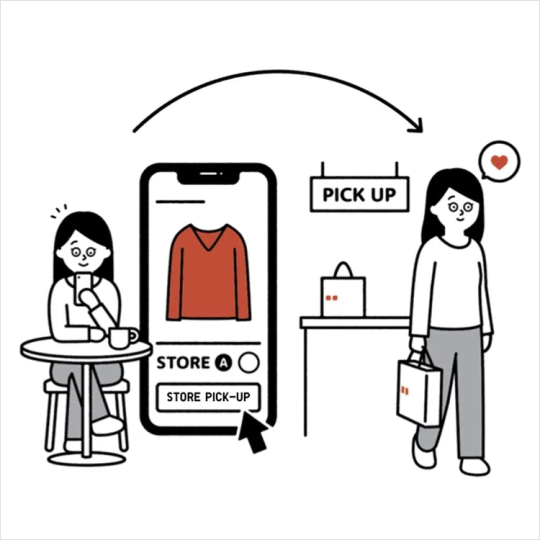
| (O2O) In-store Pick-up ( In-stock Items ) ( Inventory From The Store ) | as early as one hour after the order is placed | as early as one hour after the order is placed |
| (O2O) In-store Pick-up ( With Warehouse Transfer ) ( Inventory From The Warehouse ) | 1-2 working days | 2-3 working days |
| Home Delivery ( Personal address / Pickup at Locker / Pickup Point ) ( Inventory From The Warehouse ) | 2-3 Working Days | 3-4 Working Days |
※ Orders containing items requiring trouser length alteration will require an additional 1 working day for delivery ( Home Delivery Order only )
※ Some products may require additional preparation time. Delivery may take an extra 3-7 business days. )
1. Click & Collect (O2O) | Store Inventory or Warehouse-Shipped Orders
The designated pickup person will receive an SMS notification when the order arrives at the selected store.
Orders will be held at the store for 14 days. If the order is not collected within this period, a refund will be processed automatically.
2. Home Delivery ( Personal Address )
The courier will contact the recipient by phone to arrange a delivery time.
3. Courier Delivery ( Self-pickup Locker or Service Point )
Once the parcel arrives at the designated pickup locker or service point, the logistics provider will send a pickup code to the recipient via the SF Express mobile application.
To download the SF Express mobile application (SFHK APP) or learn more about the service, please < Click Here > to visit the SF Express webpage.
※ Please collect your parcel within the designated period. Additional storage fees charged by the service provider may apply if the parcel is not collected on time.
※ Delivery to smart lockers may be delayed if the lockers are full. For details, please contact the relevant logistics provider.
-
Q. How can I select a delivery method?
A.
(1) On the product page, select your preferred colour, size, delivery method, and quantity, then add the item to your shopping cart.
(2) You can review the delivery method for each item in your shopping cart. If you wish to make changes, please click [ Change Delivery Method ]. -
Q. Is there a delivery fee?
A.
1. Click & Collect (O2O) Orders ( Store Inventory or Warehouse-Shipped Orders ) :
No delivery fee will be charged.2. Courier Delivery ( Personal Address or Pickup Locker / Service Point ) :
A delivery fee of HKD / MOP $30 applies.
Free delivery is available for orders of HKD / MOP $350 or above using a single delivery method. -
Q. Can I choose any address when selecting [ Home Delivery ]?
A. Home delivery is available to most commercial, industrial, and residential areas in Hong Kong and Macau.
However, delivery is not available to P.O. Box addresses or certain restricted areas that require special access permits. -
Q. How to change or add a personal address during checkout?
A. You can click [ Edit ] next to [ Ship to personal address ] to update or add your delivery address.
Step 1 :
①. Select an existing address and click [ Edit ] to update it.
②. Or click [ Add new address ] to enter a new delivery address.
Step 2 :
Fill in the required details and click [ Save ].
※ Address must be within 60 characters. Use a simplified format if needed.
※ Do not enter smart locker or pickup point addresses.
※ Postal code is not required.
Step 3 :
Select the address you want to use and click [ Confirm ].
※ Please double-check the details. Once the order is placed, it cannot be changed. -
Q. How to select a pickup point address during checkout?
A. Click [ Search Pickup Point ] next to [ Ship to Pickup Point ] to choose your pickup location.
※ If you change the delivery method during checkout, you’ll need to reselect the pickup point.
※ Please confirm all order details before submitting. Once the order is placed, it cannot be changed.
On the [ Search Pickup Point ] page, you can select a pickup point or smart locker address :
①. Choose your preferred district.
②. Or use [ Search by location ] to find the nearest pickup point based on your phone’s location. -
Q. Why can’t I select my preferred store for pickup?
A. You may not be able to choose your preferred store due to :
①. Out of stock at warehouse
②. Low or limited stock at your selected store
( If only a few items remain, they are prioritized for walk-in customers. Therefore, pickup is only available at selected stores with sufficient inventory. )
[ Suggested Solutions ]
▶ Visit a nearby store and ask staff to help transfer the item from another store with stock.
※ Excludes items sold exclusively at designated or flagship stores.
▶ Choose a different store or delivery method.
Contact UNIQLO Hong Kong & Macau
 Contact Us
* If our Chatbot is unable to reply to your inquiry, our Live Chat Agent will provide further assistance to you.
* Live Agent Support is available Mon- Sun 9am-6pm.
(Including Public Holidays & Weekend)
* 如希望連接中文版智能聊天室,請於進入聊天室前,先於右上角選擇語言為「中文」。